

Rudolf Hensel Revit Plugin – Automated Planning of Fire Penetration Seals
From openings planning in Autodesk Revit directly to the right penetration seal system
Developed together with MagiCAD, the free Rudolf Hensel plugin for Autodesk Revit links BIM-based MEP and openings planning with the selection of suitable fire protection penetration seals.
Based on planned openings and the associated MEP installations, the plugin identifies suitable HENSOTHERM® and HENSOMASTIK® penetration seal systems, calculates material quantities and creates product-specific BIM objects directly in the Revit model.
Download and use it now, free of charge!
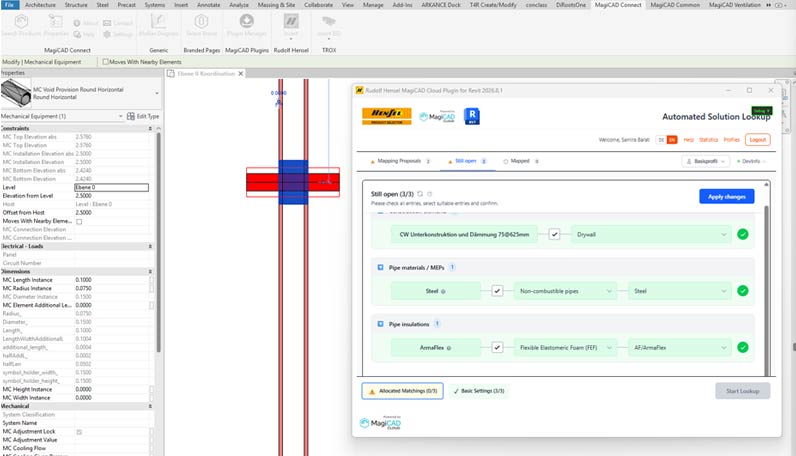
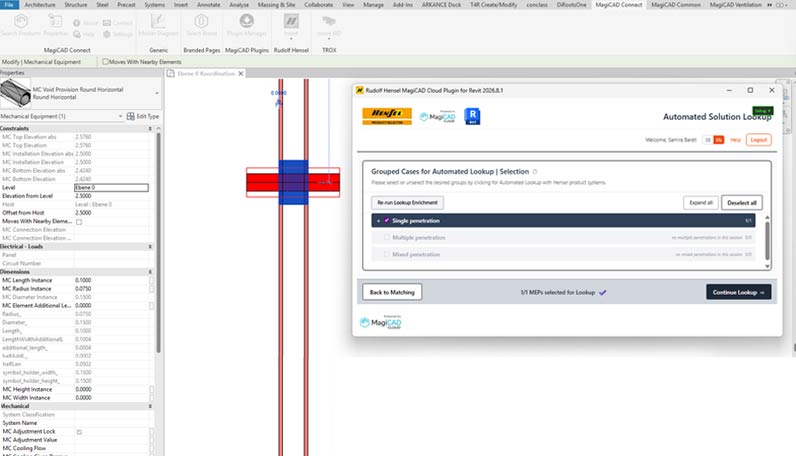
Plan penetration seals from the very beginning
Planning penetration seals requires numerous technical and building code requirements to be taken into account. Key factors include the fire-resistance time, the properties of the penetrated building elements and MEP installations, and the permitted distances and installation conditions.
In BIM-based MEP planning, openings are coordinated between the trades at an early stage. However, suitable penetration seal systems are often selected only in a separate planning step. In construction practice, this unfortunately still happens all too often only when the specialist sealing contractor arrives on site.
The Rudolf Hensel Revit plugin connects both processes and increases planning reliability for openings in construction elements with fire resistance requirements. The information relevant for the assessment is taken from the BIM model and used for system-supported product selection. This allows suitable penetration seals and their requirements for opening dimensions to be considered early in the planning process, and the material requirements (Bill of Materials, BoM) for a construction project to be determined.
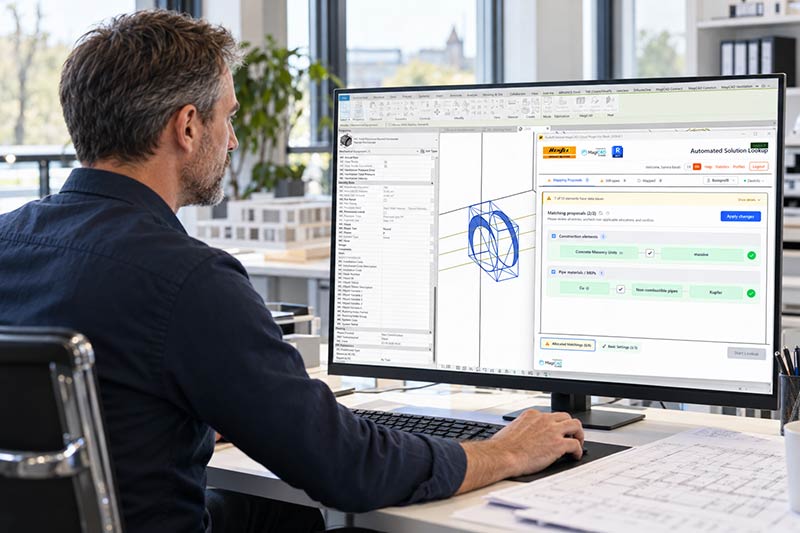
Benefits for planners
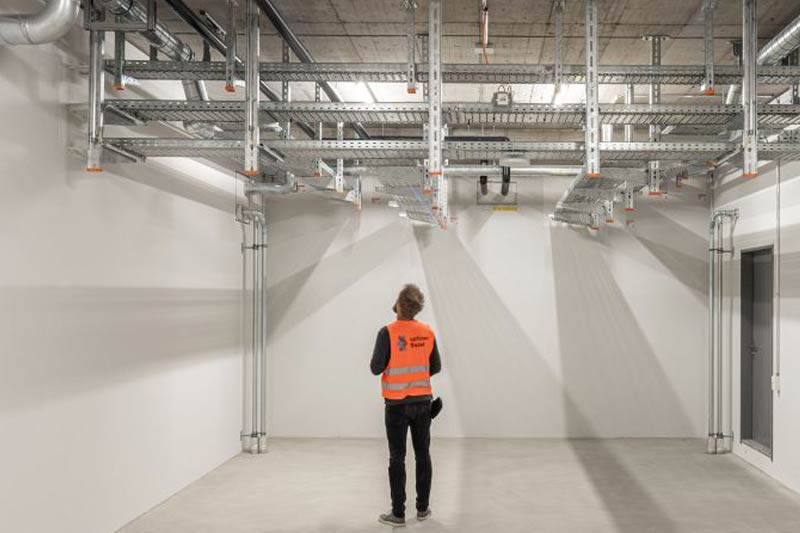
Benefits for contractors
Automated product selection
Suitable penetration seals are identified and proposed on the basis of the available building element and installation parameters, using the database of the Rudolf Hensel Product Selector for penetration seals (productselector.de).
Direct integration in Autodesk Revit
Selected penetration seal systems are placed at the planned openings as parametric BIM objects and provided with product-specific information.
Optimisation of opening dimensions
The dimensions of the placeholder elements for planned openings (Provisions for Void, PfV), created with the MagiCAD toolset for openings planning, are adjusted to the requirements of the selected penetration seal system. This helps reduce the risk of oversized or undersized openings and supports more accurate coordination between MEP installations and the selected penetration seal systems. The plugin adapts them specifically to the selected product systems and, where applicable, to required local section insulation, insulation thicknesses or permitted annular gap widths.
Efficient handling of recurring installation situations
Similar sealing cases, e.g. for MEP services running through several storeys or rooms with identical installation situations, are grouped and can be processed together. Saved user profiles and mapping rules reduce repetitive input.
Integrated calculation of material requirements
The required material quantities are calculated for the selected penetration seal systems and can be used as a basis for quantity and cost estimates.
Product-specific BIM data and documentation
The generated BIM objects contain product-specific parameters and links to further product information, the building authority approval, the material requirements and supplementary technical documents.
From identifying openings to a modelled penetration seal system – how the Rudolf Hensel Revit plugin works
Step 1 – Plan and create openings with MagiCAD
The MagiCAD toolset for openings planning detects clashes between MEP installations and construction elements and generates corresponding opening objects (Provisions for Void) as placeholders in the Revit model. Provisions for void created using MagiCAD’s Provision for Builderswork Automatic tool contain all information relevant to penetration seal planning (element thickness, density, opening size, type and diameter of the penetrating services, wall thickness, insulation, insulation thickness, penetration angle, etc.). The plugin retrieves available technical parameters from the Revit models. Missing or incomplete information can be supplemented during the subsequent product selection process.
Step 2 – Select openings
The Rudolf Hensel plugin is launched from the MagiCAD Connect tab. The planned openings can be selected, filtered (e.g. by storey or discipline) and transferred for further processing and for finding suitable penetration seals.
Step 3 – Identify suitable penetration seal systems
The Hensel Revit plugin transfers the available model data to the web-based Rudolf Hensel product search, which accesses the Rudolf Hensel Product Selector database as well as the user’s profile and preferences.
A guided mapping process helps interpret the names used in the model for building elements and MEP components. Missing information can be added, and mapping rules and preferences for selecting product systems can be saved in user profiles for future use. The system learns as you go.
Similar installation situations are logically grouped for quick assignment, and suitable product systems for sealing are assigned according to the user’s saved preferences. This automatic selection can be reviewed, edited and commented on.
Step 4 – Calculate material requirements
Once all penetration seal systems have been assigned and accepted, the material requirements are determined. In addition to calculating the individual HENSOTHERM® and HENSOMASTIK® products required for installation (e.g. number and type of HENSOTHERM® RM pipe collars, type and length of HENSOTHERM® 7 KS Gewebe bandages, volume of fire protection paint, fillers or mortars, etc.), the plugin also estimates the required auxiliary materials (gypsum filler, mineral wool filling).
Step 5 – Model penetration seal systems in Revit
The selected product systems are transferred back to Autodesk Revit and automatically placed as BIM families at the planned openings. The opening dimensions are adjusted and product-specific parameters are stored. The results are then available in the Revit model for further planning and coordination. Material requirements are calculated per instance and stored in the model, so the detailed parts list (Bill of Materials, BoM) can be generated directly in Revit and exported to MS Excel.
Important note on planning and approval compliance
The Rudolf Hensel Revit plugin is a digital planning aid. Automated product selection and BIM modelling do not replace a professional assessment of the specific installation situation.
The responsible planner or fire safety officer must ensure that the selected penetration seal system complies with the relevant technical approvals (in particular aBG, ETA and, where applicable, VKF approval) and with the project-specific requirements.
Single penetrations today – mixed penetration seal systems tomorrow. Help shape the further development!
The current version supports automated product selection and BIM modelling of penetration seals for single penetrations. An extension for the automated planning of mixed penetration seal systems is planned for early 2027. This will make it possible to integrate larger and more complex openings with different MEP installations into the digital planning process.
We are looking for MEP planning offices, BIM coordinators and specialist penetration seal contractors who would like to use the plugin in practice and contribute their experience and requirements to its further development. We are particularly interested in feedback on integration into existing BIM workflows, the quality of model data and the planning of more complex penetration seal systems.
Download for free now and get started right away!
The Rudolf Hensel Revit plugin and the associated web-based Solution Lookup App are available free of charge. A one-time registration is required. You can register directly in the plugin when you first use it, or via the Rudolf Hensel Product Selector.
Download the Rudolf Hensel Revit plugin (external link)
Register with the Rudolf Hensel Product Selector (external link)
The required Autodesk Revit and MagiCAD licences are not included in the free offer. The General Terms of Use for Rudolf Hensel GmbH software apply.
Yes. Downloading and using the Rudolf Hensel Revit plugin and the Solution Lookup App is free of charge. Autodesk Revit and the MagiCAD Builders Work Openings Tool are required separately.
Yes. The plugin uses the opening objects created (or imported, where applicable) in Revit with the MagiCAD Builders Work Openings Tool. This requires the corresponding MagiCAD Common module. MagiCAD Common Tools are a selection of productivity and collaboration functions available on various platforms in addition to the core modules for MEP planning. They help save time on routine tasks and make coordination between project participants easier.
No. Rudolf Hensel GmbH provides the software to users free of charge as a non-binding selection and planning aid. The plugin identifies potentially suitable product systems based on the available model data. The final assessment of whether a system is permissible for the specific installation situation, based on the relevant technical approvals and project-specific requirements, remains the responsibility of the responsible planner.
The software replaces neither specialist technical advice nor the user’s own responsibility for planning, designing and checking the intended fire protection measures.
In particular, automated product selection or the creation of a BIM object does not confirm that the selected product system is permissible under building regulations or technically suitable for the specific installation situation.
The user, or the planner or specialist responsible for the project concerned, must independently verify the suitability and permissibility of the selected product system for the specific installation situation.
Among others, building element properties, fire resistance requirements, and the type and dimensions of the penetrating MEP installations. Missing information can be added during the lookup process.
Yes. Information from linked MEP, architectural and structural models can be taken into account, provided the required data and element references are available.
Yes. Multiple opening objects in a model can be selected and processed together, even the entire model if required. Before being transferred from Autodesk Revit to the web-based Lookup App, the opening objects can be filtered again (e.g. by storey, fire resistance class or discipline). In the Lookup App, similar installation situations are automatically grouped so that a penetration seal system can be assigned quickly and easily.
Single penetrations are currently supported. The extension for multiple and mixed penetrations of different service types (mixed penetration seal systems) is planned for early 2027.
In MEP openings planning, recesses in walls and floors are determined based on the planned routing of services. However, an opening that is geometrically sufficient is not necessarily suitable for the intended penetration seal. The requirements for a penetration seal system depend, among other things, on the penetrated building element, the fire resistance requirement, the type of service, the pipe dimensions, the insulation, and the permitted annular gaps and minimum distances. If these requirements are only considered after openings coordination, adjustments to opening sizes, service routing or installation distances may become necessary. Aligning MEP openings planning with the requirements of suitable penetration seal systems at an early stage reduces the risk of later redesign. The Rudolf Hensel Revit plugin supports this process by identifying potentially suitable penetration seal systems based on the available BIM model data and taking their requirements into account during modelling.
With the free Rudolf Hensel Revit plugin, suitable penetration seal systems can be identified on the basis of opening objects created with MagiCAD Provision for Builderswork and placed automatically in the Revit model. Products are selected via the web-based Lookup App, which accesses the Product Selector database (productselector.de) .
The required opening dimensions depend, among other things, on the penetration seal system, the service dimensions, the insulation and the permitted annular gaps. The Rudolf Hensel Revit plugin takes the requirements of the selected product system into account and adjusts the corresponding MagiCAD opening objects in the Revit model. The adjusted dimensions must then be checked against the project-specific conditions.
Geometric clash detection identifies where MEP services penetrate building elements and where openings are required. However, it does not confirm that a penetration seal system is suitable and permissible for the specific installation. For this, additional technical parameters and the scope of application of the respective approvals must be taken into account. The Rudolf Hensel Revit plugin supports this further product selection.
Yes. For the selected penetration seal systems, the expected requirement of individual products and necessary auxiliary materials is calculated automatically. The results are transferred to Revit, where they can be compiled in schedules and exported to Microsoft Excel. Actual consumption may differ from the calculated values.
Software-supported product selection can identify suitable penetration seal systems based on stored product data and defined planning parameters. However, this does not constitute a final confirmation of permissibility for the specific installation situation. Compliance with the relevant technical approvals, in particular ETA, aBG and, where applicable, VKF approvals, must be verified by the responsible planner or fire safety officer.